


Banfield Pet Hospital
4.64.25K Reviews
App Specs
- Version
- 5.5.3
- Updated On
- License
- Free
- Downloads
- 500,000+
- Developer
- Banfield Pet Hospital an Affiliate of Mars, Inc.
- Categories
- Medical
- Platform
- Android, iOS
Screenshots
 Analysis by AppCompare
Have you ever found yourself scrambling to recall your pet’s vaccination schedule or struggling to book a vet appointment? Well, I recently got my hands on the Banfield Pet Hospital app, and let me tell you, it’s a game-changer for pet parents like us.
Who benefits most from keeping care in one place
The app makes the most sense if your pet already receives care through Banfield. It is a medical app from Banfield Pet Hospital, an affiliate of Mars, Inc., and its purpose is to help clients review and manage veterinary care. That connection is both its clearest strength and its main boundary: it can be a practical companion to an existing Banfield relationship, but it is not a universal record system for every clinic you might visit.
If you use several veterinary practices, I would still keep a separate record of important details that need to travel with your pet. A clinic-specific app can make Banfield care easier to follow, while a folder of discharge notes or a general health record can help you share information with a different veterinarian. I would not assume that one app automatically replaces every paper record, email, or conversation involved in a pet’s care.
The distinction matters most for households with more than one caregiver. If one person books visits and another takes the pet in, having an accessible place to review care details can reduce the familiar handoff question: “When was that last done?” Before relying on it as the household’s sole reference, I would check that each caregiver can access the relevant account and that the pet’s information is current.
Making routine tasks less dependent on memory
A realistic use is the week before a routine visit. I might check the pet’s information, look at the appointment details, and review the care history before leaving home. That small bit of preparation can help me arrive ready to ask useful questions rather than trying to reconstruct the timeline in the waiting room.
For reminders, I would treat notifications as prompts to check the schedule, not as a substitute for understanding it. If an alert appears, I would confirm what it refers to and whether it calls for an appointment or another action. This is especially useful when a household has more than one pet or when care tasks are spread across the year: a quick check before acting helps avoid confusing one animal’s needs with another’s.
There is also a practical way to use the app when plans change. If I need to arrange a visit, I can try the in-app scheduling route first; if the timing or service I need is not available there, I can contact the clinic directly rather than repeatedly refreshing the screen. The digital option is convenient for straightforward booking, while a conversation is better when I need to explain a complication or ask which kind of visit is appropriate.
Worth Reading Before You Choose

EA SPORTS FC Mobile 26 Is a Bigger Football Game, but It Takes Time

Flipboard Shows What News Apps Must Do Beyond the Feed

Switching to Android Auto Means Rethinking Your Driving Routine

Google Calendar Makes a Crowded Week Easier to Manage

Ludo King Makes the Most of the Minutes Between Plans

Baby Panda World Brings Quick Play to Modern Phones, but Its Game Library Feels Busy
That distinction is important because booking a veterinary appointment is not the same as receiving veterinary advice. I would use the app to organize care and communicate through the appropriate clinic channels, but I would not rely on a reminder or educational material to judge an urgent health problem. When a pet seems seriously unwell, contacting a veterinary professional promptly is the safer choice.
All Your Pet Needs in One Place
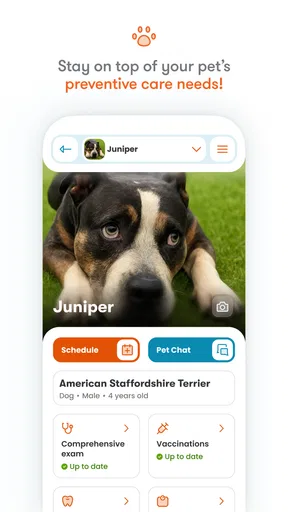
So, picture this: You’ve got a busy life, and keeping track of your furry friend’s healthcare can sometimes feel like a full-time job. That’s where the Banfield Pet Hospital app steps in to save the day. This nifty app brings all your pet’s health information right to your fingertips. It’s like having a mini vet’s office in your pocket!
Setting Up and Initial Impressions
Getting started with the app is a breeze. After downloading it from the App Store or Google Play, you simply create an account or log in if you’re already a Banfield client. The interface is clean and intuitive, making it easy to navigate even if you’re not the most tech-savvy person out there.
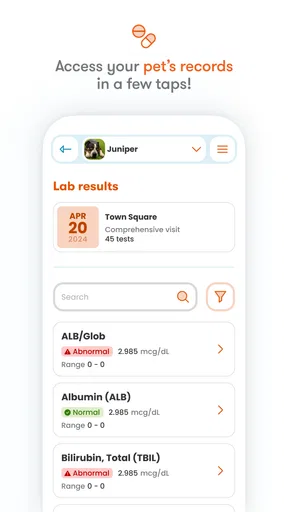
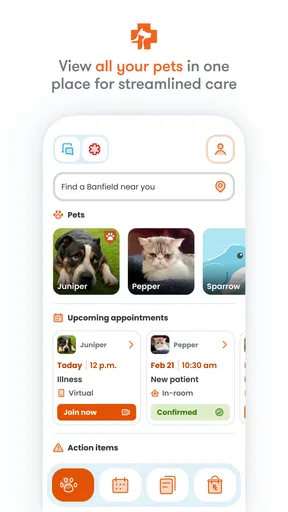
The home screen gives you quick access to your pet’s profile, upcoming appointments, and vaccination records. I was pretty impressed by how everything is organized; it’s clear that a lot of thought went into the user experience.
Features That Stand Out
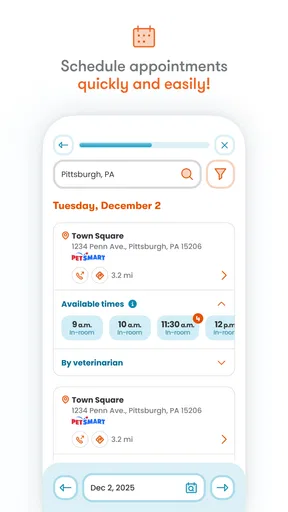
One of the standout features is the appointment scheduling. Instead of waiting on hold to book a vet visit, you can do it all through the app. Just select the service, choose a date and time, and boom—you’re all set. It’s convenient, especially for those of us who are always on the go.
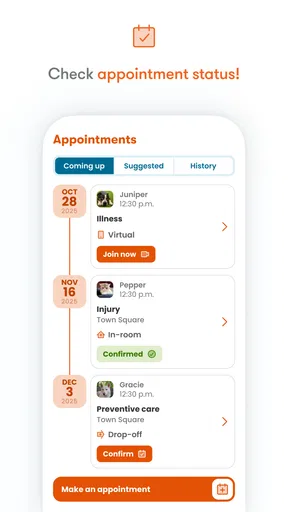
Another cool feature is the reminders and notifications. You’ll never miss a flea treatment or deworming session again, thanks to the timely alerts. Plus, the app sends reminders for upcoming appointments, which is super handy.
The app also offers access to a wealth of educational resources. Whether you’re a first-time pet owner or a seasoned pro, there’s always something new to learn about pet care. From nutrition tips to behavioral advice, it’s like having a pet expert on call 24/7.
Keeping expectations realistic
I would think of the educational material as background reading, not a substitute for a veterinary examination. It can help me prepare questions about nutrition or behavior, but an article cannot assess an individual animal’s symptoms or medical history. If something in the guidance does not seem to fit my pet, I would bring that concern to the clinic rather than trying to resolve it through general reading alone.
The app is also less compelling if you do not use Banfield for your pet’s care. A general calendar can handle appointment reminders, and a phone call may be simpler for someone who books only occasionally or prefers speaking to clinic staff. The benefit here is having Banfield-related care management together; that advantage naturally matters less when your veterinary care is elsewhere.
My Personal Experience
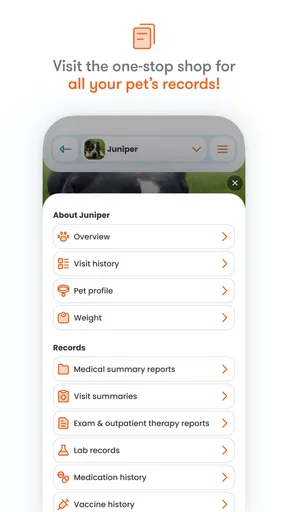
Using the Banfield Pet Hospital app has genuinely made managing my pet’s healthcare so much easier. I love being able to check my dog’s health records anytime, anywhere. It’s also reassuring to have all this information backed up digitally, eliminating the worry of losing physical documents.
I’ve used the app to schedule a couple of appointments, and the process was seamless. No more phone tag or miscommunications—it’s all straightforward and efficient. Plus, the staff at the clinic always seem to have everything ready when I arrive, which speaks to the app’s integration with Banfield’s system.
Version history and the experience today
The app was released on February 3, 2014, and its current version is 5.4.3. That establishes a long-running product with a current numbered release, but I would not infer a specific feature change from the version number alone. For an existing user, the useful question is whether the current app continues to make familiar tasks—checking care details and arranging visits—straightforward on the phone they use now.
It is free to download, has an Everyone age rating, and requires Android 6.0 or later on Android devices. Those basics make it accessible to many households with compatible phones, though an older operating system can be a practical barrier. The app has a 4.7 average from around 21 thousand ratings, with roughly 4.1 thousand written reviews and over 500 thousand installs. Those figures suggest that many people have tried it, but they cannot guarantee that every clinic interaction or booking will feel the same.
When installing or updating, I would check that I am using the official Banfield app and that my device meets the operating-system requirement. If a familiar screen or process changes after an update, I would first check the current app and account details before assuming that a pet’s records have disappeared. For anything important to an upcoming visit, confirming directly with the clinic is a sensible backup.
What I would watch before depending on it
My practical test is whether the app reliably supports the tasks I actually do: finding the right pet profile, reviewing relevant care information, and managing a routine appointment. I would also pay attention to whether reminders are clear enough for my household and whether the booking options suit the visit I need. These are more useful measures of fit than simply counting how many functions appear in a menu.
If you are choosing between this and a clinic’s usual phone-based process, the app is best when you value self-service and want to check information without calling for every routine task. Calling remains the better route when a question needs context, when scheduling is complicated, or when you are unsure whether your pet needs urgent attention. I see the two approaches as complements rather than insisting that one must replace the other.
Wrapping It Up
All in all, if you’re a Banfield client or considering becoming one, I’d highly recommend giving the app a try. It’s well-designed, user-friendly, and packed with features that genuinely make a difference in managing your pet’s health. The ability to have everything in one place is invaluable, and the peace of mind it provides is priceless.
In a world where staying organized is key, the Banfield Pet Hospital app is an essential tool for every pet parent. So, go ahead, download it, and make life a little easier for both you and your furry friend!
My recommendation is strongest for someone already using Banfield who wants a convenient way to keep routine care in view. If you use another veterinary provider, need a shared record across multiple clinics, or prefer handling every appointment by phone, the app may not add enough to your routine. For Banfield households, though, it is a reasonable place to start when organizing everyday veterinary care—while keeping direct clinic contact available for anything that needs personal guidance.
Pros
- User-friendly interface for easy navigation.
- Comprehensive pet health records accessible.
- Appointment scheduling is straightforward.
- Push notifications for medication reminders.
- Access to a wide range of pet care tips.
Cons
- Limited features available offline.
- Occasional syncing issues with records.
- Some features require premium account.
- Appointment availability may be limited.
- No support for exotic pets.
FAQs for Banfield Pet Hospital
What services does the Banfield Pet Hospital app offer?
The Banfield Pet Hospital app provides a wide range of services including appointment scheduling, access to your pet's medical records, and reminders for upcoming vaccinations. It also offers resources for pet care tips and the ability to chat with veterinary experts for advice and guidance.
Is the Banfield Pet Hospital app user-friendly?
Yes, the app is designed with an intuitive interface, making it easy for users to navigate. From booking appointments to accessing pet health records, the app aims to provide a seamless experience. The layout is straightforward, ensuring that even first-time users can manage their pet’s health efficiently.
Can I access my pet's medical history through the app?
Absolutely, the app allows you to view detailed medical records for your pet. This includes past appointments, vaccination history, and any treatments or prescriptions. Having such information readily available helps in staying informed about your pet’s health and preparing for future veterinary visits.
How secure is my personal information on the Banfield Pet Hospital app?
The app employs robust security measures to protect your personal information and your pet's medical data. Encryption and secure servers ensure that your data remains confidential. Users can trust that their sensitive information is safeguarded while using the app’s features.
Is the Banfield Pet Hospital app free to download and use?
Yes, the app is free to download on both Android and iOS platforms. However, certain features, like direct consultations with veterinary experts, may require additional fees. Users can enjoy basic functionalities like appointment scheduling and record access without any extra charges.


